UE 热更
UE 热更
资源
使用插件HotPatcher,具体操作查看文档地址:https://imzlp.com/posts/17590/。
遇到一个问题:Io Store不能被打开:
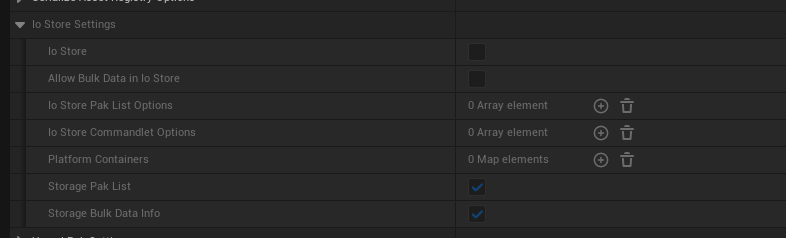
所以在Project Settings -> Packaging -> Use Io Stroe 要取消,导出的pkg包就可以更新成功。
至于为什么没被打开,是因为CookPatchAssets打开时,Io Store是不被可用的。
蓝图热更实操(Windows Dev 测试包)
目标:改一两个蓝图后不重新完整打包,把改动做成补丁 pak 塞进已有测试包里验证。下面记录 UE5.4 上一套跑通的流程。
原理
- 测试包内容是纯
.pak(没开 IoStore、没有.ucas/.utoc、未签名未加密)。UE 启动时把Content\Paks\下所有.pak按优先级挂载,文件名带_P后缀的补丁包优先级最高,覆盖基础包里同路径的资产。 - 所以资产热更不用写任何 C++:把
*_P.pak拷进Content\Paks\,游戏启动自动加载并覆盖。 - cook 产物只取决于平台(Windows)+ 引擎版本,与 build 配置(Development / Shipping / DebugGame)无关。用 Development 基础包挂 Development 编辑器 cook 出的补丁包,完全兼容。
一次性接入
前置:
.uproject里启用 HotPatcher 插件。- 命令行 cook 用的编辑器可执行文件,必须和你编译过 HotPatcher 插件的那套配置一致。比如插件只在 DebugGame editor 下编过,就得用
UnrealEditor-Win64-DebugGame-Cmd.exe;编了 Development editor 才能用默认的UnrealEditor-Cmd.exe。用没编过插件的配置去 cook,会在启动时因插件加载失败。
打基础包(RunUAT BuildCookRun,-clientconfig=Development,-build -cook -stage -pak -archive)时有两个坑要提前避开:
- 别加
-nocompileeditor:cook 步骤会启动对应配置的编辑器跑 cook commandlet。如果只编了 DebugGame 编辑器,又不让 UAT 顺带编 Development 编辑器 + 插件,cook 启动时就会因插件加载失败。 - 带上
-AdditionalCookerOptions=-noxgeshadercompile:强制本地编译 shader,避开分布式 shader 编译器死锁(见下文坑 5)。
产物里两样东西:启动器 MyGame.exe,内容目录 Content\Paks\(几十 GB 的 pakchunk*.pak)。
基准清单(base manifest)用 -run=HotRelease 生成,产物是一份含全工程所有资产 MD5 的大 JSON(几十 MB)。它只给全量 diff 补丁用;日常单蓝图迭代不需要它(见下节快速路径),此处仅为完整性保留。
日常:快速单资产补丁(推荐)
全量 diff 路径太慢会卡死,日常一律走这条。涉及三个文件:
| 文件 | 作用 |
|---|---|
GeneratePatchFast.bat | 运行脚本(-run=HotPatcher + -AddAssetsByFile + -noxgeshadercompile) |
PatchConfig_Fast.json | 精简配置:bByBaseVersion:false,assetIncludeFilters:[],不做全量扫描/diff |
addassets_patch.txt | 要打补丁的资产清单,一行一个长包名 |
步骤:
- 改蓝图,在编辑器里存盘(Ctrl+S / Save All)。 补丁工具从磁盘上的
.uasset读数据,不读编辑器内存——不存盘 = 改动不进包。 - 编辑
addassets_patch.txt,填资产长包名(/Game/...,不带.uasset后缀,一行一个)。例如:/Game/Characters/Hero/Weapon/Unarmed/GameplayAbilities/AttackLight/BP_TestSpawn /Game/Characters/Hero/Weapon/Unarmed/GameplayAbilities/AttackLight/GA_Unarmed_AttackLight长包名 = 磁盘路径里
.../Content/之后的部分,前面换成/Game,去掉.uasset。
例:<Project>\Content\Characters\Hero\...\BP_TestSpawn.uasset→/Game/Characters/Hero/...\BP_TestSpawn - 运行
GeneratePatchFast.bat。只 cook + pak 清单里的资产,正常几秒出包(实测 <1 秒完成 diff+cook+pak)。 - 产物:
Saved\HotPatcher\Patch\Patch_001\Windows\Patch_001_Windows_001_P.pak - 把这个
_P.pak拷进测试包的Content\Paks\。 - 运行
MyGame.exe验证改动是否生效。
判断成功:
- 别看 bat 的 exit code(它可能报
FAILED exit code 1但其实成功了,见坑 6)。 - 以下两条同时满足即成功:日志里有
Export Patch Misstion is Successed, return 0!;Saved\HotPatcher\Patch\Patch_001\Windows\下生成了*_P.pak。 - 想确认 pak 里到底打了哪些文件,看同目录的
*_P_PakCommands.txt(列出每个进包的.uasset/.uexp)。
用编辑器 UI 直接打补丁(不启动独立引擎)
GeneratePatchFast.bat 会单独拉起一个 -run=HotPatcher 的命令行引擎实例来 cook。如果编辑器已经开着,其实不用再起一个进程——命令行的 -config / -AddAssetsByFile 和编辑器里 HotPatcher 窗口的 Patcher 设置是完全同一套东西,直接在当前编辑器 UI 里打即可。
步骤:
- 打开 HotPatcher 窗口:主工具栏的 HotPatcher 图标,或 Tools(工具)菜单 → HotPatcher;打开后在左侧模式列表选 Patcher(补丁模式)。
- 导入 Fast 配置:Patcher 界面上方 Import 按钮,加载
PatchConfig_Fast.json。versionId、bByBaseVersion:false(不做全量 diff)、平台 Windows、savePath等会一次性填好,跟命令行一致。 - 手动加入目标资产(唯一差别):bat 是用
-AddAssetsByFile=addassets_patch.txt从命令行注入,JSON 配置本身不含这些资产;UI 里要手动填。把addassets_patch.txt的长包名逐条加进 Patcher 设置的 Include Specify Assets(指定资产)列表。想连依赖一起打,勾上bAnalysisFilterDependencies(Fast 配置里默认 false)。 - 点 Export Patch / Generate Patch(界面底部)。产物同样落在
Saved\HotPatcher\Patch\<Chunk>\Windows\下的*_P.pak,之后照旧拷进测试包Content\Paks\。
两个前提和 bat 一样:
- Export 前先 Ctrl+S 存盘目标资产,否则 cook 的是旧版本。
- shader 死锁:bat 的
-noxgeshadercompile是关掉分布式 shader 编译、改本地编译(见坑 5)。编辑器 UI cook 没法传这个命令行参数,若不先在编辑器里关掉分布式 shader 编译,可能踩同样的死锁。规避:在 Editor Preferences /[DevOptions.Shaders]里禁用分布式(XGE)shader 编译后再启动编辑器;或目标只是一两个基本不产生新 shader 的资产时,先裸跑 Export,卡住了再关。
权衡:改动是一两个蓝图、编辑器已开着 → UI 直打最省事(省掉起独立引擎的开销)。要批量、脚本化、无人值守、或想稳定复用
-noxgeshadercompile→ 仍走GeneratePatchFast.bat。
全量 diff 补丁(备用,不推荐日常)
GeneratePatch.bat + 全量配置会扫全 /Game(十几万资产)逐个算 MD5,跟基准清单 diff,自动找出所有改动并按 chunk 分别出包。适用于一次改了很多资产、懒得手写清单、要按 chunk 分包的场景。代价是在本机磁盘上极慢——实测卡死 2 小时零进展(见坑 1),除非确有需要否则别用。
踩过的坑
坑 1:全量 diff 卡死(最坑)。 全量配置每次都扫十几万资产逐个读盘算 MD5,只为找出改的那几个。在本机磁盘 I/O 下挂了 2 小时零进展(日志停在 FAssetDependenciteParser Asset Num,内存从 16.5GB 塌到 1.8GB、CPU 只剩个位数)。日常改几个蓝图一律用快速路径。
坑 2:commandlet 名字是 HotPatcher 不是 HotPatch。 补丁 commandlet 类是 UHotPatcherCommandlet,命令行要写 -run=HotPatcher。写成 -run=HotPatch 会报 HotPatchCommandlet looked like a commandlet, but we could not find the class. 并空跑退出。(生成基准清单的是另一个:-run=HotRelease → UHotReleaseCommandlet。)
坑 3:改完必须存盘。 补丁工具读磁盘上的 .uasset,不是编辑器内存里的未保存状态。改完不 Ctrl+S,补丁包里就是旧内容。
坑 4:cook 用的编辑器配置必须和编过插件的一致。 插件只在 DebugGame editor 下编过,命令行就必须用 UnrealEditor-Win64-DebugGame-Cmd.exe;用没编过插件的配置会因插件加载失败。
坑 5:分布式 shader 编译死锁。 打基础包 cook 时,分布式 shader 编译器可能在最后几十个材质上死锁(任务派给远程 agent 后不返回,IsCachedCookedPlatformDataLoaded 永远 false,编辑器冻住)。所有涉及 cook 的命令都加 -noxgeshadercompile(或 -AdditionalCookerOptions=-noxgeshadercompile),强制本地编译。
坑 6:bat 报 FAILED exit code 1 是假警报。 补丁进程退出码可能是 1,但 HotPatcher 自己 Misstion is Successed, return 0、pak 也正常生成。exit 1 来自引擎退出时统计到 1 个 error,实为 HttpListener unable to bind to 127.0.0.1:3000(开着的编辑器占用了 3000 端口)或 libcurl error 35 (SSL connect error)(telemetry 上报被网络拦截),两者都跟 pak 无关。判定成功以「日志有 Successed + pak 文件存在」为准。
坑 7:热更不需要 C++。 基础包是纯 pak(无 IoStore、未签名未加密),_P.pak 丢进 Content\Paks\ 就自动高优先级挂载覆盖,无需改 GameInstance/挂载逻辑。
坑 8:C++ / .cpp 改动无法用 pak 热更。 补丁只能覆盖资产(.uasset)。C++ 代码改动(.cpp/.h)不在 pak 覆盖范围,必须重新编译 + 重打包。
坑 9(仅命令行/脚本编辑时):.bat 需 CRLF + 纯 ASCII。 在 Git-Bash/MSYS 里生成或编辑这些 bat 时,行尾必须是 CRLF(否则 cmd 会把参数当成独立命令乱跑),内容保持纯 ASCII(别混中文/BOM/chcp/^ 续行)。通过 Bash 调 cmd.exe /c 或 taskkill 时,前面加 MSYS_NO_PATHCONV=1,否则 /c、/F 等 flag 会被 MSYS 当路径转换掉。直接双击运行 bat 的用户无需关心此条。
脚本与配置
下面几个脚本/配置都放在工程的 HotPatcherConfig\ 下。路径里 <Engine> 是引擎根目录、<Project> 是工程根目录,MyGame 是工程名,按自己项目替换。
日常改一两个蓝图只会用到前三个:GeneratePatchFast.bat、PatchConfig_Fast.json、addassets_patch.txt。
addassets_patch.txt——要打补丁的资产长包名,一行一个,不带 .uasset:
/Game/Characters/Hero/Weapon/Unarmed/GameplayAbilities/AttackLight/BP_TestSpawn
/Game/Characters/Hero/Weapon/Unarmed/GameplayAbilities/AttackLight/GA_Unarmed_AttackLight
PatchConfig_Fast.json——快速补丁配置,bByBaseVersion:false + 空 assetIncludeFilters,不做全量扫描/diff:
{
    "versionId": "Patch_001",
    "bByBaseVersion": false,
    "bEnableExternFilesDiff": false,

    "bEnableChunk": false,
    "bCreateDefaultChunk": true,

    "bCookPatchAssets": true,
    "bStorageNewRelease": false,
    "bStorageDeletedAssetsToNewReleaseJson": false,

    "pakTargetPlatforms": [ "Windows" ],

    "bCustomPakNameRegular": true,
    "pakNameRegular": "{VERSION}_{CHUNKNAME}_{PLATFORM}_001_P",
    "bCustomPakPathRegular": true,
    "pakPathRegular": "{CHUNKNAME}/{PLATFORM}",
    "savePath": { "path": "<Project>/Saved/HotPatcher/Patch" },

    "assetScanConfig": {
        "bPackageTracker": false,
        "bAnalysisFilterDependencies": false,
        "bIncludeHasRefAssetsOnly": false,
        "bForceSkipContent": false,
        "assetIncludeFilters": [],
        "assetIgnoreFilters": []
    },

    "chunkInfos": []
}
GeneratePatchFast.bat——只 cook + pak 清单里的资产,几秒出包。注意用的 Cmd 要和编译过 HotPatcher 插件的配置一致(这里是 DebugGame):
@echo off
setlocal

REM HotPatcher - 快速单资产补丁(不做全 /Game diff)
REM 只打 addassets_patch.txt 里列的资产(-AddAssetsByFile),
REM Fast 配置里 bByBaseVersion=false 所以不跑 base diff。
REM 改完资产要先在编辑器 Ctrl+S 存盘。
REM -noxgeshadercompile: 强制本地编译 shader,避开分布式编译死锁。
REM 用 DebugGame-Cmd 以匹配唯一编译过的 HotPatcher 配置。

set "ENGINE_CMD=<Engine>\Engine\Binaries\Win64\UnrealEditor-Win64-DebugGame-Cmd.exe"
set "PROJECT=<Project>\MyGame.uproject"
set "CONFIG=<Project>\HotPatcherConfig\PatchConfig_Fast.json"
set "ADDASSETS=<Project>\HotPatcherConfig\addassets_patch.txt"

if not exist "%ENGINE_CMD%" ( echo [ERROR] Cmd not found: %ENGINE_CMD% & exit /b 1 )
if not exist "%PROJECT%"    ( echo [ERROR] uproject not found: %PROJECT% & exit /b 1 )
if not exist "%CONFIG%"     ( echo [ERROR] config not found: %CONFIG% & exit /b 1 )
if not exist "%ADDASSETS%"  ( echo [ERROR] addassets not found: %ADDASSETS% & exit /b 1 )

"%ENGINE_CMD%" "%PROJECT%" -run=HotPatcher -config="%CONFIG%" -AddAssetsByFile="%ADDASSETS%" -noxgeshadercompile -unattended -stdout -UTF8Output -NoLogTimes

set "EXITCODE=%ERRORLEVEL%"
if "%EXITCODE%"=="0" (
    echo DONE. 产物: %Project%\Saved\HotPatcher\Patch\ 下的 *_001_P.pak
) else (
    echo exit code %EXITCODE% —— 别只看这个,以「日志有 Successed + pak 存在」为准
)
endlocal
PackageWindowsDev.bat——打 Development Win64 基础包(build+cook+stage+pak+archive 一把梭)。别加 -nocompileeditor:
@echo off
setlocal

REM 打 Development Win64 基础包,作为 HotPatcher 测试底包。
REM cook 产物只取决于 平台+引擎版本,与 build 配置无关,
REM 所以这个 Development 底包能挂后面生成的 _P 补丁包。
REM 别加 -nocompileeditor:cook 会启动 Development 编辑器跑 cook
REM commandlet,本工程只编了 DebugGame 编辑器,不让 UAT 顺带编
REM Development 编辑器 + 插件的话,cook 启动即失败。

set "UAT=<Engine>\Engine\Build\BatchFiles\RunUAT.bat"
set "PROJECT=<Project>\MyGame.uproject"
set "ARCHIVE=<Project>\LocalBuilds"

if not exist "%UAT%" ( echo [ERROR] RunUAT.bat not found: %UAT% & exit /b 1 )

REM -AdditionalCookerOptions=-noxgeshadercompile: 强制本地编译 shader。
REM 分布式 shader 编译器曾在最后几十个材质上死锁(任务派给远程 agent
REM 不返回),本地编译避开它。没加 -clean,已 cook 的包会复用。
call "%UAT%" BuildCookRun -project="%PROJECT%" -noP4 -platform=Win64 -clientconfig=Development -build -cook -stage -pak -archive -archivedirectory="%ARCHIVE%" -utf8output -unattended -AdditionalCookerOptions=-noxgeshadercompile

set "EXITCODE=%ERRORLEVEL%"
if "%EXITCODE%"=="0" (
    echo DONE. 产物在 %ARCHIVE%\Windows\,含 MyGame\Content\Paks\*.pak,MyGame.exe 可启动
) else (
    echo FAILED exit code %EXITCODE%,往上翻 Error/Exception
)
endlocal
GenerateBaseRelease.bat——生成基准清单(全量 diff 补丁才需要,日常用不到):
@echo off
setlocal

REM HotPatcher - 生成基准 Release 清单(Base_001)。
REM 命令行跑 HotRelease commandlet,等价于 Release 页点 Export Release。
REM 产物: Saved\HotPatcher\ 下含全工程资产 hash 的清单。
REM 同样必须用编译过插件的那套 Cmd(这里 DebugGame)。

set "ENGINE_CMD=<Engine>\Engine\Binaries\Win64\UnrealEditor-Win64-DebugGame-Cmd.exe"
set "PROJECT=<Project>\MyGame.uproject"
set "CONFIG=<Project>\HotPatcherConfig\Base_001_Release.json"

if not exist "%ENGINE_CMD%" ( echo [ERROR] Cmd not found: %ENGINE_CMD% & exit /b 1 )
if not exist "%PROJECT%"    ( echo [ERROR] uproject not found: %PROJECT% & exit /b 1 )
if not exist "%CONFIG%"     ( echo [ERROR] config not found: %CONFIG% & exit /b 1 )

"%ENGINE_CMD%" "%PROJECT%" -run=HotRelease -config="%CONFIG%" -unattended -stdout -UTF8Output -NoLogTimes

set "EXITCODE=%ERRORLEVEL%"
if "%EXITCODE%"=="0" ( echo DONE. 清单在 %Project%\Saved\HotPatcher\ ) else ( echo FAILED exit code %EXITCODE% )
endlocal
GeneratePatch.bat + PatchConfig.json——全量 diff 补丁(备用,慢,易卡)。脚本结构同上,把 -config 换成全量配置、去掉 -AddAssetsByFile:
"%ENGINE_CMD%" "%PROJECT%" -run=HotPatcher -config="<Project>\HotPatcherConfig\PatchConfig.json" -unattended -stdout -UTF8Output -NoLogTimes
全量配置 PatchConfig.json 的关键点:bByBaseVersion:true 指向基准清单,开 chunk,扫全 /Game 逐个算 MD5 做 diff,再按 chunk 分包。示意(chunk 路径按自己工程目录结构填):
{
    "versionId": "Patch_001",
    "bByBaseVersion": true,
    "baseVersion": { "filePath": "<Project>/Saved/HotPatcher/Base_001/Base_001_Release.json" },
    "bEnableExternFilesDiff": true,

    "bEnableChunk": true,
    "bCreateDefaultChunk": false,
    "bCookPatchAssets": true,
    "bStorageNewRelease": true,

    "pakTargetPlatforms": [ "Windows" ],
    "bCustomPakNameRegular": true,
    "pakNameRegular": "{VERSION}_{CHUNKNAME}_{PLATFORM}_001_P",
    "bCustomPakPathRegular": true,
    "pakPathRegular": "{CHUNKNAME}/{PLATFORM}",
    "savePath": { "path": "<Project>/Saved/HotPatcher/Patch" },

    "assetScanConfig": {
        "bPackageTracker": true,
        "bForceSkipContent": true,
        "assetIncludeFilters": [ { "path": "/Game" } ],
        "assetIgnoreFilters": [
            { "path": "/Game/__ExternalActors__" },
            { "path": "/Game/__ExternalObjects__" },
            { "path": "/Game/_DO_NOT_SHIP" },
            { "path": "/Game/Developers" }
        ]
    },

    "chunkInfos": [
        { "chunkName": "Gameplay", "assetIncludeFilters": [ { "path": "/Game/_BP" }, { "path": "/Game/_AbilitySystem" }, { "path": "/Game/_GameFramework" }, { "path": "/Game/_Characters" } ], "assetIgnoreFilters": [] },
        { "chunkName": "Data",     "assetIncludeFilters": [ { "path": "/Game/_Data" }, { "path": "/Game/_StringTable" } ], "assetIgnoreFilters": [] },
        { "chunkName": "UI",       "assetIncludeFilters": [ { "path": "/Game/_UI" } ], "assetIgnoreFilters": [] },
        { "chunkName": "FX_Audio", "assetIncludeFilters": [ { "path": "/Game/_VFX" }, { "path": "/Game/_SFX" }, { "path": "/Game/_Sound" } ], "assetIgnoreFilters": [] },
        { "chunkName": "Scene",    "assetIncludeFilters": [ { "path": "/Game/_Scene" }, { "path": "/Game/Levels" }, { "path": "/Game/Map" } ], "assetIgnoreFilters": [] },
        { "chunkName": "Art_Base", "bAnalysisFilterDependencies": true, "assetRegistryDependencyTypes": [ "Packages" ], "assetIncludeFilters": [ { "path": "/Game" } ], "assetIgnoreFilters": [ "把上面各 chunk 的 include 路径全列进来,避免重复进包" ] }
    ]
}
Art_Base用「include 全/Game+ ignore 掉其它所有 chunk 的路径」兜底剩余美术资产,并靠bAnalysisFilterDependencies把依赖也带上。
代码
比较成熟的解决方案:
puerts
- 安装TS:
npm install -g typescript - 放到插件目录后查看
YouProject/Plugins/Puerts/Source/JsEnv/JsEnv.Build.cs设置的V8版本,再对应去下载 - 解压到
YouProject/Plugins/Puerts/ThirdPart,并在JsEnv.build.cs中修改UseV8Version设置为你所下载的版本。 - 在
YouProject/Plugins/Puerts目录下运行node ./enable_puerts_module.js - 在
YouProject目录下运行npm init -y - 在
YouProject/package.json中添加
  "scripts": {
    "build": "tsc -p tsconfig.json",
    "watch": "tsc -p tsconfig.json --watch"
  },
- 生成工程,启动引擎,点击运行游戏按钮旁边蓝色按键生成中间类。或者在引擎中运行
Puerts.Gen命令 - 在
YouProject目录下运行npm run build
UE.Load报错
报错:
Puerts: Error: (0x0000024DFC84E050) TypeError: Cannot read
  properties of undefined (reading 'Load')
      at F:\Learn\PuertsLearn\PuerTSDemo\Content\JavaScript\Blueprints\BP_Te
  stActor.js:38:19
      at executeModule (F:\Learn\PuertsLearn\PuerTSDemo\Content\JavaScript\p
  uerts\modular.js:70:9)
      at require (F:\Learn\PuertsLearn\PuerTSDemo\Content\JavaScript\puerts\
  modular.js:183:29)
      at F:\Learn\PuertsLearn\PuerTSDemo\Content\JavaScript\Main.js:3:1
      at executeModule (F:\Learn\PuertsLearn\PuerTSDemo\Content\JavaScript\p
  uerts\modular.js:70:9)
      at require (F:\Learn\PuertsLearn\PuerTSDemo\Content\JavaScript\puerts\
  modular.js:183:29)
根本原因:你使用的 TypeScript 6.0.2 默认强制启用 esModuleInterop,导致 import * as UE from 'ue' 被编译为 __importStar(require("ue"))
而不是直接 require("ue")。
__importStar 会把 PuerTS 的 UE 模块(一个依赖 Proxy 实现懒加载的对象)拷贝成一个普通对象,Proxy 的 get trap 不再生效。UE.Class
没有被预先注册(它需要在访问时通过 Proxy 触发 loadUEType("Class") 才能加载),所以返回 undefined。
修复:在 tsconfig.json 中添加了两个选项:
  "esModuleInterop": false,
  "ignoreDeprecations": "6.0"
这样 import * as UE 会直接编译为 const UE = require("ue"),保留 Proxy 懒加载机制。
注意 esModuleInterop: false 在 TS 7.0 将被移除,届时可能需要 PuerTS 官方适配(比如将 UE 模块的 __esModule 设为
true,或者换用其他模块加载方式)。
另一种方案是锁定TS的版本,在package.json中添加
 "devDependencies": {
    "typescript": "5.8"
  }
然后 输入npm install 即可。
关于GC的问题
暂时不解决把