GAS Gameplay Attribute 详解
GAS Gameplay Attribute 详解
Gameplay Attribute 是 GAS 里存储角色数值的核心数据结构——生命、耐力、攻击力、载具速度,凡是描述拥有者特性的浮点数都走它。
每个 Attribute 都有两个值,分清它们是用好 GAS 的前提:
- Base Value(基础值)——永久性的底值,长期稳定。
- Current Value(当前值)——结合所有激活 GE 实时算出来的临时值。
举个例子:玩家基础跳跃力是 100(Base),升级后变 110(仍是 Base);受伤状态下只能跳 70%,那当前跳跃力就是 70(Current),升级后受伤则是 77(Current)。Base 是"你本来多强",Current 是"你现在多强"。
Attribute Set
属性多了要归类,GAS 用 UAttributeSet 把逻辑相关的属性组织成集合——基础属性一个集、变身能力一个集,各管一摊。
- 每个 Attribute 用
FGameplayAttributeData表示。 - 每个 AttributeSet 含一个或多个 Attribute。
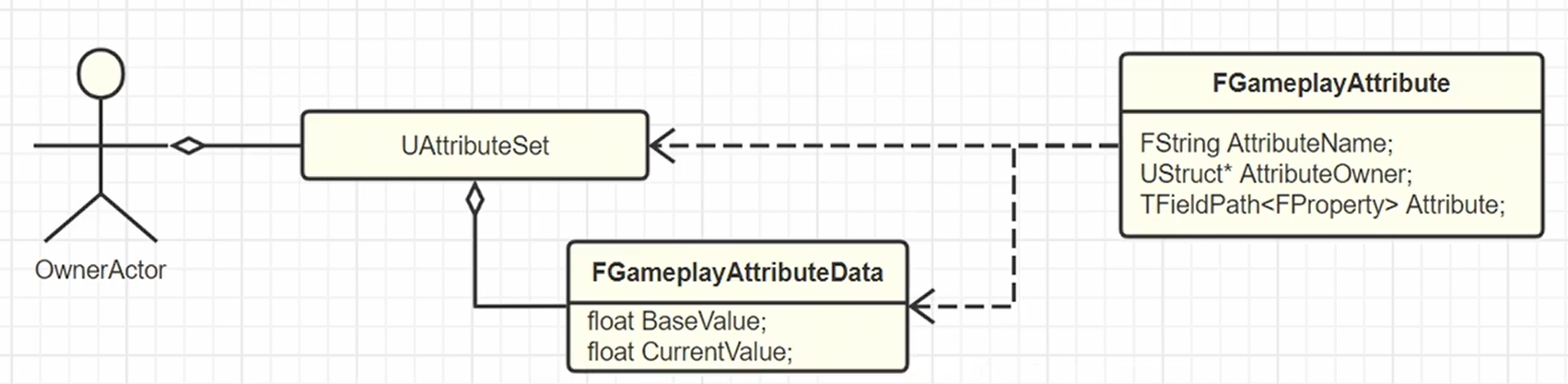
UAttributeSet 写法
拿官方 Lyra 项目的 ULyraHealthSet 片段当模板最直观:
// 快速生成 Get/Set 的便捷宏
#define ATTRIBUTE_ACCESSORS(ClassName, PropertyName) \
    GAMEPLAYATTRIBUTE_PROPERTY_GETTER(ClassName, PropertyName) \
    GAMEPLAYATTRIBUTE_VALUE_GETTER(PropertyName) \
    GAMEPLAYATTRIBUTE_VALUE_SETTER(PropertyName) \
    GAMEPLAYATTRIBUTE_VALUE_INITTER(PropertyName)

UCLASS()
class ULyraHealthSet : public UAttributeSet
{
public:
    ULyraHealthSet();

    // UE5.6 起可直接用 ATTRIBUTE_ACCESSORS_BASIC 宏
    ATTRIBUTE_ACCESSORS(UBaseAttributeSet, Health);
    virtual void GetLifetimeReplicatedProps(TArray<FLifetimeProperty>& OutLifetimeProps) const override;

    // 属性越界处理
    virtual void PreAttributeChange(const FGameplayAttribute& Attribute, float& NewValue) override;

protected:
    UFUNCTION()
    void OnRep_Health(const FGameplayAttributeData& OldValue);

private:
    // 绑定 OnRep_ 函数监测属性变更
    UPROPERTY(BlueprintReadOnly, ReplicatedUsing = OnRep_Health, Category = "Lyra|Health", Meta = (HideFromModifiers, AllowPrivateAccess = true))
    FGameplayAttributeData Health;
};
ULyraHealthSet::ULyraHealthSet()
    : Health(100.0f)
{}

// 注册要同步的属性,用 DOREPLIFETIME_CONDITION_NOTIFY 设置复制条件和通知策略
void ULyraHealthSet::GetLifetimeReplicatedProps(TArray<FLifetimeProperty>& OutLifetimeProps) const
{
    Super::GetLifetimeReplicatedProps(OutLifetimeProps);
    DOREPLIFETIME_CONDITION_NOTIFY(ULyraHealthSet, Health, COND_None, REPNOTIFY_Always);
}

void ULyraHealthSet::PreAttributeChange(const FGameplayAttribute& Attribute, float& NewValue)
{
    Super::PreAttributeChange(Attribute, NewValue);
    if (Attribute == GetHealthAttribute())
    {
        // 生命值不为负,也不超过 max health
        NewValue = FMath::Clamp(NewValue, 0.0f, GetMaxHealth());
    }
}

void ULyraHealthSet::OnRep_Health(const FGameplayAttributeData& OldValue)
{
    GAMEPLAYATTRIBUTE_REPNOTIFY(ULyraHealthSet, Health, OldValue);
    OnHealthChanged.Broadcast(...);
}
绑定与注册
AttributeSet 作为 Actor 的子对象创建,再由 ASC 自动收编:
// 在 Pawn 里声明并创建 AttributeSet 子对象
UPROPERTY(VisibleAnywhere, BlueprintReadOnly)
TObjectPtr<UBaseAttributeSet> BaseAttributeSet;

AMyPawn::AMyPawn()
{
    // 会被 AbilitySystemComponent::InitializeComponent 检测到
    BaseAttributeSet = CreateDefaultSubobject<UBaseAttributeSet>(TEXT("BaseAttributeSet"));
}
ASC 在初始化时扫描 Owner 的所有子对象,把 AttributeSet 收进管理:
void UAbilitySystemComponent::InitializeComponent()
{
    TArray<UObject*> ChildObjects;
    GetObjectsWithOuter(GetOwner(), ChildObjects, false, RF_NoFlags, EInternalObjectFlags::Garbage);

    for (UObject* Obj : ChildObjects)
    {
        UAttributeSet* Set = Cast<UAttributeSet>(Obj);
        if (Set)
        {
            SpawnedAttributes.AddUnique(Set);
        }
    }
}
一个 ASC 上可以挂多个 AttributeSet,但每种 Class 只能有一个——同一 ASC 里每种 AttributeSet 是唯一的。
用 DataTable 初始化基础值
Base Value 可以从 DataTable 批量导入。CSV 导入时行类型选 AttributeMetaData:
| --- | BaseValue | MinValue | MaxValue | DerivedAttributeInfo | bCanStack |
|---|---|---|---|---|---|
| MyAttributeSet.Health | 100.000000 | 0.000000 | 150.000000 | False |
struct FAttributeSetGrant
{
    UPROPERTY(EditAnywhere, BlueprintReadOnly, meta=(AssetBundles="Client,Server"))
    TSoftClassPtr<UAttributeSet> AttributeSetType;

    // 用来初始化属性的数据表(可留空)
    UPROPERTY(EditAnywhere, BlueprintReadOnly, meta=(AssetBundles="Client,Server"))
    TSoftObjectPtr<UDataTable> InitializationData;
};

{
    TSubclassOf<UAttributeSet> SetType = Attributes.AttributeSetType.LoadSynchronous();
    UAttributeSet* NewSet = NewObject<UAttributeSet>(AbilitySystemComponent->GetOwner(), SetType);
    UDataTable* InitData = Attributes.InitializationData.LoadSynchronous();
    NewSet->InitFromMetaDataTable(InitData);
    AbilitySystemComponent->AddAttributeSetSubobject(NewSet);
}
属性只能由 GE 修改
这是 GAS 的硬规则:Gameplay Effect 是修改 Attribute 的唯一合法通道。所有变动都得过 GE,这样修改过程才可追踪、能触发回调、被统一管控。任何手动直接写属性的操作都是禁止的。
改 Base 还是 Current,取决于 GE 的时长策略(和 Gameplay Effect 详解 里那张表一致):
| GE 类型 | 修饰符 | 执行计算 | 改 Base | 改 Current |
|---|---|---|---|---|
| Instant | 立即改 Base | 立即执行改 Base | ✓ | 随 Base 变 |
| Duration | 临时修正影响 Current | 应用/移除时执行 | ✗ | ✓ |
| Infinite | 临时修正影响 Current | 应用/移除时执行 | ✗ | ✓ |
| Periodic | 每周期像 Instant 改 Base | 每周期执行改 Base | ✓ | 随 Base 变 |
记法很简单:Instant/Periodic 是永久变化(伤害、治疗、升级),Duration/Infinite 是临时修正(Buff/Debuff)。
有个 Periodic 的小坑:如果你要的是"到 Period 时间点才生效",得把下面这个默认开关关掉。

属性的钳制和事件触发集中在 AttributeSet 的两个回调里:PreAttributeChange(改之前钳值)和 PostGameplayEffectExecute(改之后触发事件,比如血量归零派死亡)。
Base 变了,Current 怎么刷新
改 Base Value 时会连带重算 Current,而 Current 的结果受临时修正类 GE 影响。核心逻辑在 SetAttributeBaseValue:
// 设置永久 Base Value,并自动重算更新 Current Value
void FActiveGameplayEffectsContainer::SetAttributeBaseValue(FGameplayAttribute Attribute, float NewBaseValue)
{
    float OldBaseValue = 0.0f;
    Set->PreAttributeBaseChange(Attribute, NewBaseValue);

    // 更新 AttributeSet 里的 FGameplayAttributeData
    if (FGameplayAttribute::IsGameplayAttributeDataProperty(Attribute.GetUProperty()))
    {
        const FStructProperty* StructProperty = CastField<FStructProperty>(Attribute.GetUProperty());
        FGameplayAttributeData* DataPtr = StructProperty->ContainerPtrToValuePtr<FGameplayAttributeData>(const_cast<UAttributeSet*>(Set));
        OldBaseValue = DataPtr->GetBaseValue();
        DataPtr->SetBaseValue(NewBaseValue);
    }

    FAggregatorRef* RefPtr = AttributeAggregatorMap.Find(Attribute);
    if (RefPtr)
    {
        // 存在临时修正:交给 Aggregator 重算 Current
        FAggregator* Aggregator = RefPtr->Get();
        OldBaseValue = Aggregator->GetBaseValue();
        Aggregator->SetBaseValue(NewBaseValue);
    }
    else
    {
        // 无临时修正:Current = Base
        InternalUpdateNumericalAttribute(Attribute, NewBaseValue, nullptr);
    }

    Set->PostAttributeBaseChange(Attribute, OldBaseValue, NewBaseValue);
}
关键就是那个 FAggregator:它聚合所有提供临时修正的 Duration/Infinite GE,动态算出 Current Value。有一个"持续 10 秒 +10 当前血量"的 GE 时 Aggregator 生效,GE 移除时 Aggregator 也随之清空。
案例:迟缓 Debuff 与风场加速 Buff 叠加
这个场景能把"Base/Current/Aggregator/钳制"四件事串起来。两个 GE 用不同方式影响 MovementSpeed:
迟缓 Debuff GE_Slow_Debuff——Has Duration(10 秒),Modifier 是 ModOp_Multiply 0.5。它是临时修正,只改 Current:10 秒内 Current = Base × 50%,结束自动移除。
风场 Buff GE_WindZone_Acceleration——Infinite + Period 1.0,Modifier 是 ModOp_Add +5.0。它每周期永久加 Base,需要在 AttributeSet 里钳制上限(比如最高 +20),并且由触发盒/碰撞事件来应用和移除,而不是 Ability。
假设角色初始 MovementSpeed 的 Base 和 Current 都是 200:
| 步骤 | Base | Current |
|---|---|---|
| 应用迟缓 | 200 | 200 × 0.5 = 100 |
| 进风场,周期执行第 1 次 | 205 | 205 × 0.5 = 102.5 |
| 第 2 次 | 210 | 105 |
| 第 3 次 | 215(PostGameplayEffectExecute 钳到 ≤220) | 107.5 |
| 10 秒后迟缓结束(乘法修正消失) | 215 | 215 |
| 离开风场(触发器移除) | 215 | 215 |
几个要点:
- 临时 vs 永久——迟缓是乘法临时修正(只动 Current),风场是加法永久变化(动 Base + 周期)。
- 自动聚合——
FAggregator自动处理叠加:先算 Base,再乘临时修正得 Current。 - 钳制在 AttributeSet——
PostGameplayEffectExecute负责拦住风场把 Base 顶到无限大。 - 移除方式不同——迟缓自动到期移除,风场靠外部事件(离开触发器)移除。
最后一条经验:GE 改属性的方式是固定的那几种运算。如果你的需求涉及复杂数值公式,与其硬掰 Modifier,不如直接上 Execution Calculation 或换个实现思路。